Architecture
Echo Agent contains a desktop workspace and a standalone runtime. Both connect models, context, and tools through an Agent loop, but use different execution engines and manage configuration and state independently.
System context
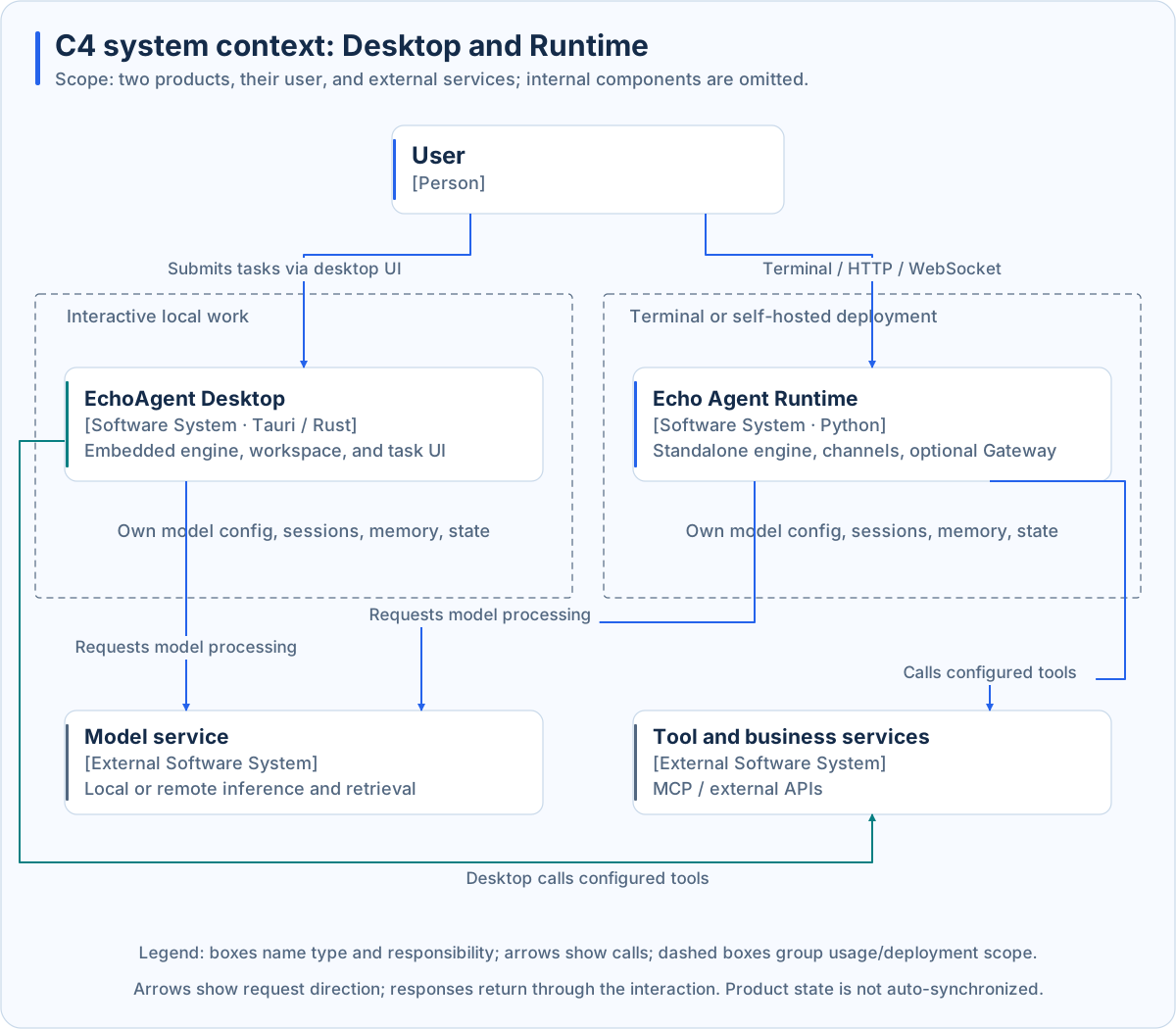
This C4-style context view names system types and responsibilities. Directed solid lines show requests, with responses returning through the interaction. Dashed outer boundaries group usage or deployment scope.
| Area | Desktop | Standalone Runtime |
|---|---|---|
| Entry points | Task UI, coding workspace, expert groups | Terminal, channels, Gateway |
| Engine | In-process Rust engine | Standalone Python engine |
| Host | Windows, workspaces, IDE, local services, lifecycle | Composition, channels, scheduling, service lifecycle |
| Interface | Desktop application | Gateway Dashboard; CLI/TUI |
| Extensions | Embedded tools, Desktop MCP, skills, plugins | Built-in tools, MCP, skills, Python plugins |
| State | Application data and working directories | Instance workspace and storage |
There is no default synchronization of sessions, memory, or configuration. Desktop does not require Python Gateway. Building an application against Gateway is a separate service integration path.
Runtime components
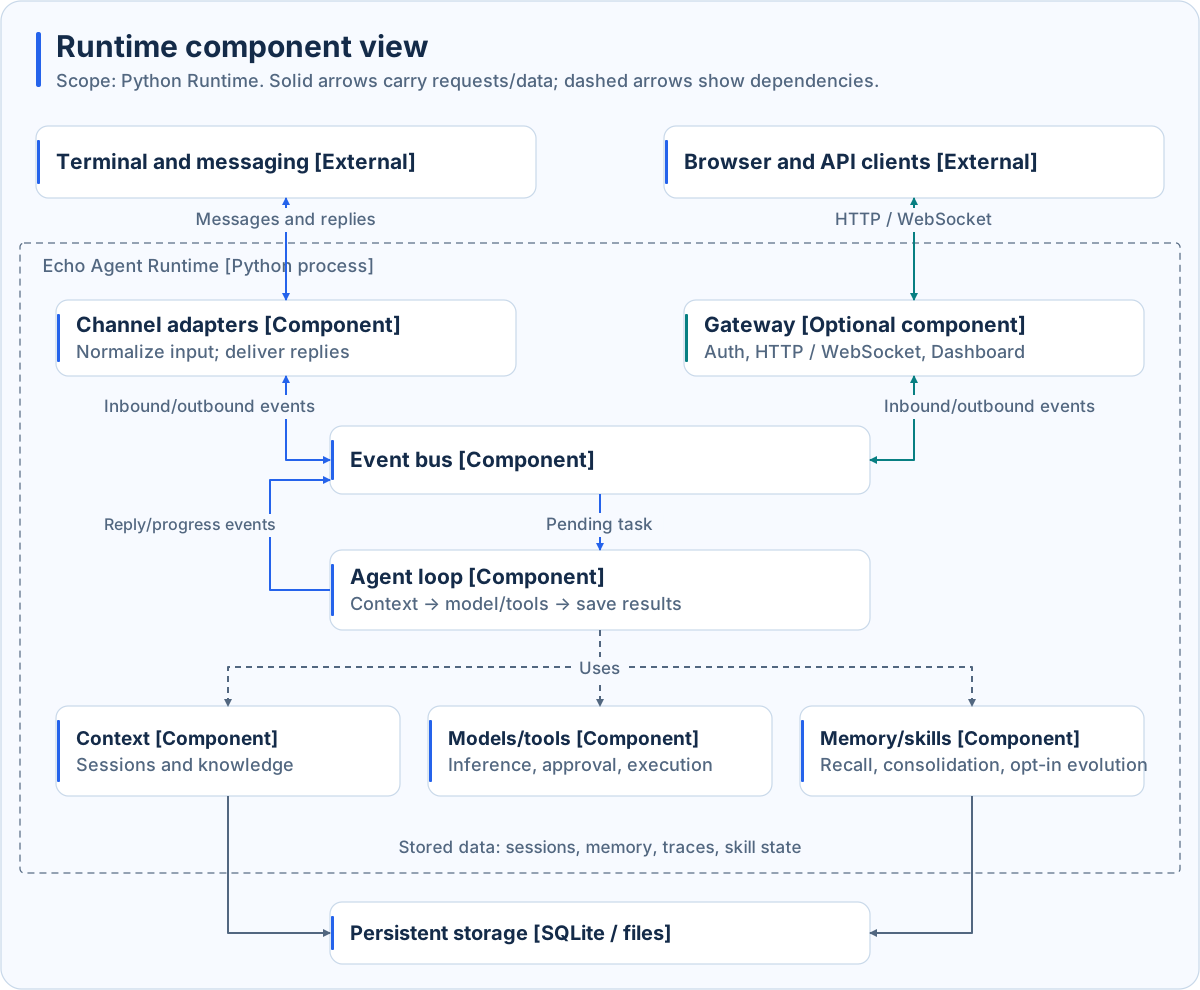
This view expands Python Runtime only. Solid arrows carry requests or data; dashed arrows show dependencies. Gateway is optional.
| Component | Responsibility | Purpose |
|---|---|---|
| Channel adapters | Normalize input and format replies | Reuse execution while isolating platform differences |
| Gateway | HTTP, WebSocket, authentication, management | Share an instance with browser and application clients |
| Event bus | Dispatch input and output events | Decouple intake, execution, and delivery |
| Agent loop | Coordinate sessions, context, inference, tools, finalization | Turn goals into controlled operations |
| Context management | Select history, memory, knowledge, skills | Fit relevant information into a finite window |
| Models and tools | Request reasoning; validate, approve, execute operations | Separate decisions from actions |
| Persistence | Retain sessions, memory, traces, task state | Enable continuity, inspection, and recovery |
Task interactions
sequenceDiagram
    actor U as User or client
    participant E as Entry layer
    participant A as Agent loop
    participant C as Context management
    participant M as Model service
    participant P as Permission checks
    participant T as Tool
    participant S as Persistent storage
    U->>E: Submit goal and input
    E->>A: Normalized task event
    A->>C: Request turn context
    C->>S: Read relevant history, memory, knowledge
    S-->>C: Available content
    C-->>A: Budgeted context
    loop While task state and budget permit
        A->>M: Context and execution feedback
        M-->>A: Text or tool request
        opt Tool requested
            A->>P: Check scope, policy, approval
            alt Allowed
                P-->>A: Allow
                A->>T: Execute validated operation
                T-->>A: Result or error
            else Denied
                P-->>A: Denial reason
            end
        end
    end
    A->>S: Save session and execution result
    A-->>E: Final result and completion state
    E-->>U: Reply and deliverables
This UML sequence shows a typical tool-using task. Approval may require user input. Tasks without tools skip that branch. Streaming and progress can arrive earlier; final completion must match actual execution state.
Lifecycle and operating modes
Startup prepares configuration, models, storage, Agent, channels, and optional services. Shutdown coordinates cancellation, persistence, and cleanup. Foreground execution and Gateway share this lifecycle. Attached CLI/TUI clients do not create another engine.
Usually run one full Runtime per workspace. Define storage, workspace, and credential boundaries before scaling or serving different trust domains. See Runtime modes and Security.
Continue reading
Desktop architecture explains local hosting; Agent loop explains action selection; Events and delivery distinguishes execution from delivery.